How Does On-Page SEO Help Local Businesses Get Found?
On-page SEO for local business means shaping every page of your website — titles, headings, content, images, structure — so Google clearly understands what you do and where you do it. It is how a plumber in Leeds tells Google “I fix boilers in Leeds” in language Google can trust and rank.
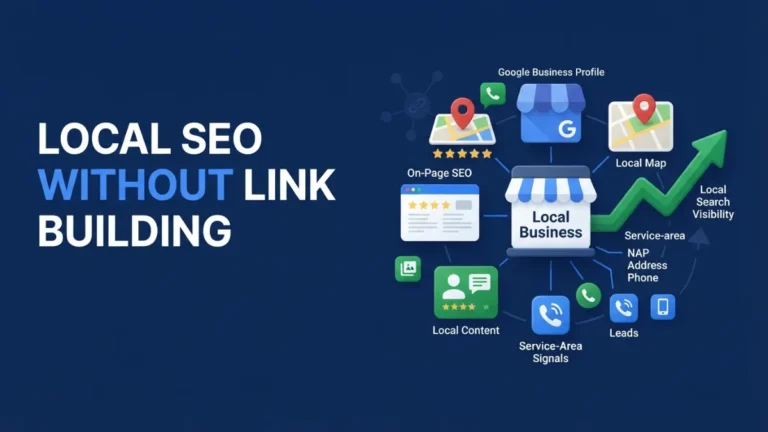
Think of it this way: your Google Business Profile is your shopfront on Google’s street; your website is the building behind it. When someone searches “emergency plumber near me,” Google checks your profile, then reads your website to confirm the details — services, areas, contact details. Weak on-page SEO is a building with no sign on the door. Strong on-page SEO means every page answers a question Google and your customer are asking.
This guide explains how on-page SEO helps local businesses get found — built from the questions real owners ask online, and the mistakes practitioners keep finding on their sites.
Do I need a separate page for every service and every city I serve?
No — one strong page per service and per key location wins.
This is the single most common structural question local owners ask, and the answer is about quality, not quantity. Google needs enough signal to understand each thing you do: if you offer boiler repair, bathroom fitting, and drain unblocking, but describe all three in one “Services” list, Google gets a thin signal for each. One dedicated page per core service gives each service room to breathe — its own title, headings, photos, FAQs, and proof.
The same logic applies to locations, with one critical condition: each location page must be genuinely unique. A page for Leeds and a page for Bradford should read like they were written by someone who works in those towns — real jobs done there, local testimonials, area-specific details. Copy-paste pages with only the city name swapped are exactly what Google’s spam policies describe as doorway abuse: pages created to funnel searchers rather than to help them. Practitioners report these templated city pages earn nothing and can get filtered out of results entirely.
The rule of thumb: build a dedicated page only where you can say something real and different. Five strong service pages beat twenty thin ones.
Why is Google rewriting my page titles in the search results?
Google rewrites titles when it thinks its version helps more.
Owners are often surprised to learn the title tag they write is a suggestion, not a command. Google documents this openly: its systems may generate a different “title link” when they judge an alternative to be more helpful for the searcher. You cannot force Google to use your exact title. What you can do is write titles that give Google no reason to rewrite them: unique on every page, roughly 50–60 characters, keyword near the front, city where relevant. A clear, human-readable title like “Boiler Repair in Leeds | Fixed-Price Callouts” is far less likely to be rewritten than a stuffed one like “Boiler Repair Leeds | Best Boiler Repairs Leeds Cheap.”
Short version: write the title a customer would want to click, and Google will usually leave it alone.
Should I put my city name in every title, heading, and paragraph?
Use the city name where it reads naturally — not everywhere.
Owners know location matters, so the instinct is to sprinkle the city name into everything. Put the geo-qualifier where it counts — the title tag, the one H1, key headings — and let body copy mention the city only where it genuinely fits. A page that reads “plumber Leeds” twelve times does not convince Google you serve Leeds; it convinces Google (and readers) the page was written for a robot.
Google’s local ranking factors are relevance, distance, and prominence. The city name in your title and H1 feeds relevance. Repeating it in every paragraph adds nothing — and the page reads terribly to the customer deciding whether to call you.
How much duplicate content is allowed across my location pages?
No official percentage exists; every page needs genuine value.
This question comes up constantly — owners want a “safe percentage” rule for how much text they can reuse across city pages. Here is the honest answer: Google has never published any such number, and anyone selling you one is guessing. What Google does publish is a policy against scaled content abuse and doorway pages: mass-produced pages with little unique value get filtered.
The practical test: cover the city name on two location pages and ask whether a reader could tell which town each is about. If not, they are too similar. Genuine local value means different jobs, different testimonials, different area notes, different photos. Write for the town, not for the template.
I published lots of pages but nothing ranks — what am I missing?
Thin pages earn nothing — depth on real pages beats volume.
One of the most common complaints in local SEO discussions: dozens of pages published, nothing ranking. The diagnosis is almost always the same — volume without depth. Google does not rank pages for existing; it ranks pages that answer something better than the alternatives.
Practitioners call the fix “content CPR”: stop blogging generic posts nobody searching is ready to hire from, and instead flesh out the pages that matter. Give every core service its own in-depth page. Add service blurbs, service-area blurbs, your unique selling points, and real reviews to the homepage. Link generously between related pages. Before publishing page number fifty-one, ask whether pages one through ten are genuinely complete. They usually are not.
How does my website work together with my Google Business Profile?
Your website and profile must tell Google one consistent story.
Your profile and website are not separate channels — they are two halves of the same trust signal, and Google cross-references them constantly. The name, address, and phone number (NAP) on your website must match your profile exactly. Practitioners flag mismatched or missing NAP as one of the most common silent killers of local visibility.
Beyond NAP, the two reinforce each other. Your profile captures the search — it is what shows in Maps and the map pack. Your website closes the customer — full service details, pricing, photos, booking. Reviews on your profile feed prominence; detailed service pages on your site feed relevance. Our Google Business Profile optimisation work always starts by lining the two up. Our NAP consistency guide walks through exactly how to line the two up.
Who does what in on-page SEO — me or my SEO provider?
You supply the raw facts; your SEO provider builds the rankings.
On-page SEO splits cleanly into two jobs. Your job (nobody can do this for you): accurate business details, real photos of your work, honest service descriptions, the questions customers actually ask you, and local proof — jobs completed in specific towns, named testimonials. Your SEO provider’s job: mapping one search intent to one page, writing the title/meta/heading architecture, building site structure and internal links, adding LocalBusiness and FAQ schema, writing content briefs, running audits, and monitoring Search Console. Google’s job: crawling your pages, sometimes rewriting your titles, and ranking you on relevance, distance, and prominence.
What should I fix first on my website this week?
Fix titles, NAP, and one service page before anything else.
- Titles and metas. Give every important page a unique title (~50–60 characters, keyword near the front, city where relevant) and a unique meta description (145–160 characters, written as a reason to click). Fix the classic mistake: two keywords crammed into one title. Pick one intent per page.
- NAP everywhere. Put your exact name, address, and phone in the site footer and contact page, matching your Google Business Profile character for character. Make the phone number click-to-call on mobile.
- One service page, done properly. Pick your most profitable service. Give it its own page: clear H1 with service + city, sections answering real customer questions, real photos with descriptive file names and alt text, a clean URL slug, and internal links from the homepage.
For the full picture of how this fits your local strategy, see what is local SEO and our local SEO services.
What is on-page SEO for a local business in simple terms?
It is optimising your website’s pages — titles, headings, content, and structure — so Google understands what services you offer and where you offer them. It feeds the “relevance” part of Google’s local ranking factors.
Does on-page SEO affect my Google Maps ranking?
Indirectly, yes. Maps rankings come from your Google Business Profile, but Google cross-references your website for relevance and NAP consistency. A strong site supports the profile; a weak or mismatched one drags it down.
How long does on-page SEO take to show results?
It varies by competition and how much was broken — typically weeks to a few months after fixes are indexed. There is no guaranteed timeline, and anyone promising one is not being straight with you.
Can I do on-page SEO myself without hiring anyone?
The foundations, yes: accurate NAP, unique titles, one H1 per page, real photos, and honest service pages are all owner-doable. Providers add value on keyword mapping, schema, site architecture, and ongoing audits.