You Now Control Your GBP Booking Links
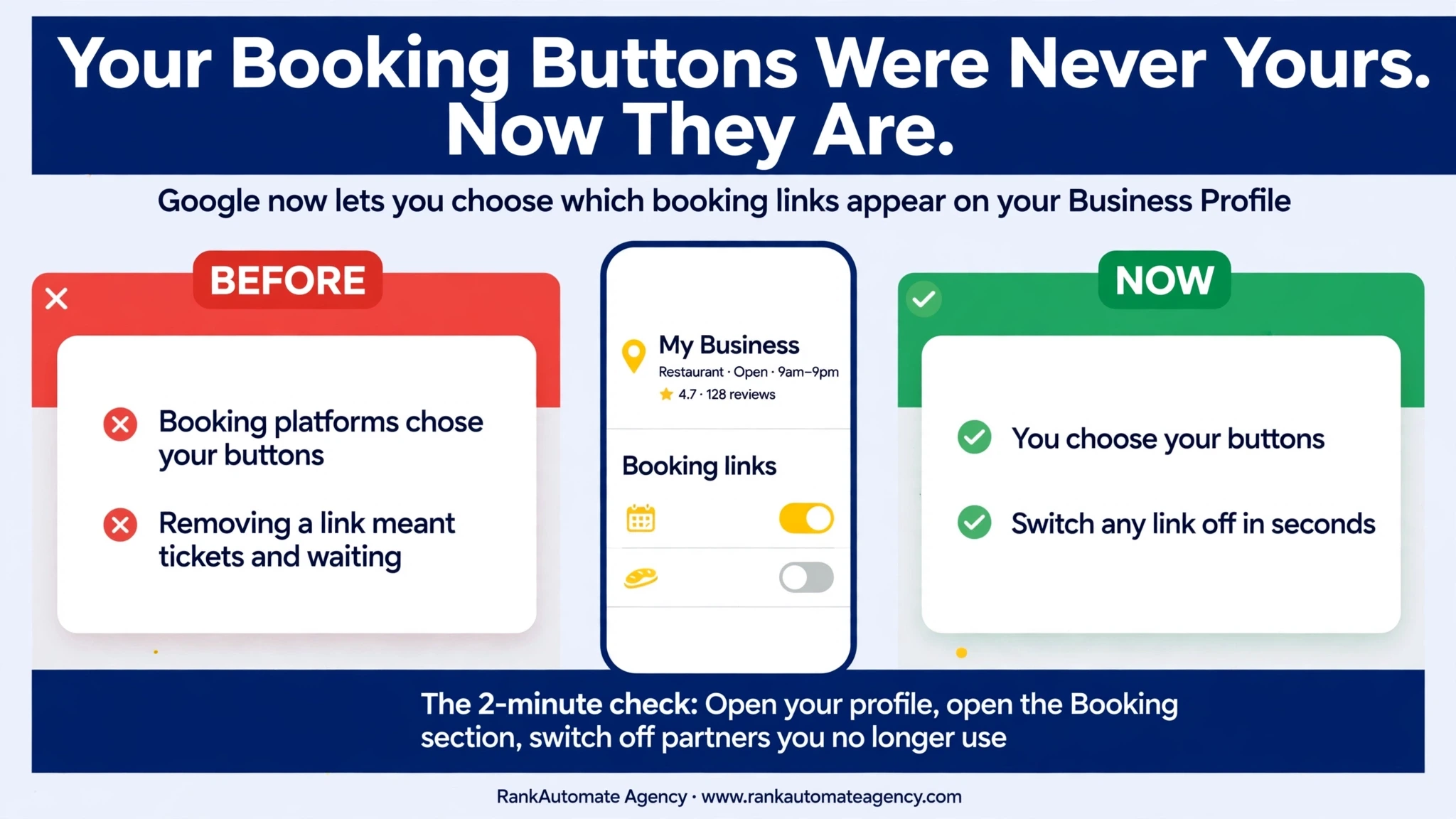
Your GBP booking links are no longer Google’s decision. Google has added self-serve controls for appointment bookings and dinner reservations on Google Business Profile, so you now choose which third-party booking buttons appear on your listing. If a booking partner no longer fits your business, you can switch its link off yourself in seconds, and switch it back on whenever you want. Search Engine Roundtable reported the change on November 23, 2026, after Lisa Landsman of Google announced it on LinkedIn in her own words: “You now choose which booking links appear on Google.”
That is a bigger shift than it sounds. Your Business Profile is the first thing most customers see when they search for you. Until this week, part of that shopfront was filled in by outside booking platforms, and you had very little say in it. Now the switch sits in your own dashboard. This article explains exactly what changed, who it covers, the two minute check to run this week, and the honest limits of what this control does and does not do.
What exactly did Google change?
Google added self-serve controls that let a business choose which appointment booking and dinner reservation links appear on its Business Profile. The business can toggle a booking or reservation partner off in seconds and turn it back on at any time, directly from the profile dashboard. Search Engine Roundtable reported the update on November 23, 2026, and Google’s Lisa Landsman announced it publicly on LinkedIn.
In plain words: the booking buttons on your listing used to arrive through your booking partners, whether you still wanted them there or not. Now there is a control for them, and it belongs to you. This is the same kind of control Google gave restaurant food delivery ordering links about a month ago. First it was food delivery links. Now it is appointments and reservations. The pattern is clear. Google is slowly handing business owners the switches for their own listings, one section at a time.
One point is worth stating plainly, because headlines can overstate it. This is control over the links on your profile. It is not a new booking system, and it does not replace the booking software you already use. It decides which of those services get a button on your Google listing, and that decision now sits
with you instead of sitting with the platforms.
Why were booking buttons you never chose a real problem?
A booking link on your profile looks small, but it is the moment a searching customer turns into an appointment or a table. If that link belongs to a partner you have moved away from, the customer can land in the wrong place. They may see old prices, old availability, or a booking flow your front desk no longer watches. Some customers will push through anyway. Others will simply book with the next business on the list, and you will never know the click happened.
Before this change, fixing that meant work. A business that wanted a third-party booking or reservation link removed from its profile could not just switch it off. It had to chase the outside platform, or file a support ticket with Google, and wait. For a busy owner, that kind of task slides down the list week after week, so the wrong link often stayed live for months. Meanwhile the listing kept sending customers through a door the business no longer used.
There is also a trust cost. Your profile carries your name, your photos, your reviews and your opening hours. Customers read the whole thing as one promise from you. A booking button that leads somewhere outdated breaks that promise at the exact moment the customer was ready to act. Owners could not see the damage in any report. They just saw fewer bookings than the search traffic suggested they should get.
Who does this cover?
The control covers the kinds of businesses that live on appointments and reservations. If your profile shows booking or reservation links from a third-party partner, this change is aimed at you.
Salons and barbers. Appointment slots are the business. If an old booking partner still shows on your profile, a client can book into a diary nobody checks. Two minutes in the Booking section confirms the button leads where your clients should land.
Clinics. Patients act on what the profile shows. A reservation or appointment link from a service you no longer use creates confusion at reception and missed appointments at the chair. The toggle lets you remove it the day you change systems, not months later.
Fitness studios. Class bookings and trial sessions often run through partner platforms. Studios change platforms as they grow. Your profile should point at the platform you use now, and with this control, changing it is a small task you finish yourself.
Local service businesses. Any business that takes booked visits, from repairs to consultations, can carry third-party booking links on its profile. If the partner no longer fits your fees, your staffing or the way your front desk works, you can turn its link off in seconds.
Restaurants. Dinner reservations are covered directly. If a reservation partner’s terms, fees or table availability no longer suit you, its button no longer has to sit on your listing while you argue with the platform. You switch it off, and you can switch it back on if the relationship improves.
How to check your GBP booking links in two minutes
You do not need a developer, an agency or a support ticket for this. Set aside two minutes and work through these steps.
Step 1. Open your Google Business Profile dashboard, the same place you update your hours and photos.
Step 2. Go to the Booking section of your profile and look at every booking and reservation link listed there.
Step 3. For each link, ask one question: is this a partner we still use, on terms that still suit us? If the answer is no, that link is a candidate for the toggle.
Step 4. Switch off any partner that no longer fits. The change is yours to reverse, so you are not making a permanent decision. You can turn the same link back on at any time.
Step 5. Open your listing the way a customer sees it, on your phone, and confirm the buttons that remain are the ones you chose. That final look is the whole audit. If the buttons match the partners you actually use, you are done.
That is the complete check. It takes about two minutes, and it is worth doing this week rather than next month, for the reason covered below.
When should you check again?
Once is not enough, because the links on your profile can change when your business changes. Run the same two minute check every time you switch booking software, end a contract with a booking platform, or take on a new reservation partner. Add it to the short list of listing checks you run a few times a year, alongside your opening hours, your services and your photos. The businesses caught out by profile changes are usually not the ones who ignored them. They are the ones who never looked again after the first setup.
Before and after, side by side
| Before this change | Now | |
|---|---|---|
| Who chose the booking buttons on your profile | Third-party booking platforms | You |
| How you removed a partner’s link | Chase the platform, or file a support ticket and wait | Toggle it off yourself in seconds |
| Turning a link back on | Another round of requests | One switch, any time |
| Where the control lives | Outside your business | Your profile dashboard |
What this control does not do
Honesty matters here, because a small dashboard change can get talked up into something bigger. This control does not bring you new customers by itself. It does not change your rankings, your reviews or where you appear in search results. It does not fix a booking partner’s own service. If the partner you keep is slow or unreliable, the button on your profile will still lead to a slow or unreliable booking flow.
It also does not clean the rest of your profile for you. Wrong hours, old photos, an out-of-date menu or service list, and unanswered reviews still sit there doing their own damage. The booking check is one item on a longer list of listing hygiene that decides whether searchers become customers. What Google has changed is who holds this one switch. The rest of the shopfront is still yours to keep tidy, and it always was.
Finally, the announcement covers the links themselves. It does not say anything about bookings customers already made through a partner you switch off. Those bookings live in the partner’s system, so if you are mid-season with appointments already taken, check with the partner before you toggle, rather than assuming either way.
Why the timing matters: the year-end rush
Google did not pick a quiet week for this, and neither should you. Year-end appointments and festive dinners are ramping up. Salons fill their books. Clinics run into the holiday squeeze. Restaurants take their biggest reservation nights of the year. The next few weeks are exactly when a wrong booking link costs the most, because the customers clicking it are ready to book now, not browsing for later.
A link that sends a ready customer to a partner you no longer use does not cost you a click. It costs you the appointment, the table, and possibly the customer’s opinion of your business, all in the busiest weeks of the year. The check takes two minutes. Run it before the rush, not during it.
There is a wider lesson in this update, and it is the one we repeat to every business we work with. Your Google listing is your shopfront. Most owners set it up once and rarely look at it again, while Google keeps adding sections, buttons and links to it. Every few months, something on your profile changes without you touching it. The owners who benefit from changes like this one are simply the owners who look. Two minutes, a few times a year, is the whole habit.
The short version
Google has handed you the switch for the booking and reservation buttons on your Business Profile. The partners you use stay one click from your customers. The partners you left behind no longer have to stay on your listing while you chase platforms and support tickets. Check your Booking section this week, keep the buttons you chose, and switch off the rest.
If you would rather have the whole profile checked properly, our Google Business Profile management service covers exactly this kind of listing hygiene: booking links, categories, services, photos, reviews and posts, checked and kept current. You can see what the service includes on our Google Business Profile service page or read more of our local SEO guides on the RankAutomate blog.
Your GBP booking links are a small part of your listing, and for the first time, they are fully your call. Make the call this week, while the year-end rush is still on its way.
Frequently asked questions
I take bookings by phone only. Does this change affect me?
Only if third-party booking or reservation links appear on your profile. If no booking buttons show on your listing, there is nothing to switch off. It is still worth a two minute look, because links can be added through partner platforms without the owner noticing at the time.
If I switch a partner off, what happens to bookings customers already made through it?
The announcement covers the links on your profile, not bookings already recorded in a partner’s system. Those bookings stay with the partner. If you hold appointments taken through a partner, confirm the position with that partner before switching its link off.
Is this the same switch restaurants got for food delivery links?
It is the same kind of self-serve control, extended to a new area. Google gave businesses control over food delivery ordering links about a month earlier. Lisa Landsman announced this step in the same spirit, in her words: “First food delivery, now appointments and reservations.”